
Live dispatch board
Every job sits on one board and moves through the same statuses your team already uses: pending, dispatched, en route, on scene, completed. Assign a driver, set priority, and update status from the office or from the truck.
What towing dispatch software is, what it actually does for a towing company, how jobs, driver pay, storage billing, and invoicing flow through it, what it should cost, and how to choose the right platform.
Reviewed by the TowLab team — the same operators who run a towing company on this software every day.
What it does
A platform earns its place in your office only if it covers the work you already do every day — dispatching, driver pay, the money, the lot, and the trucks. These are the modules to expect, and what each one does in TowLab.
Every job sits on one board and moves through the same statuses your team already uses: pending, dispatched, en route, on scene, completed. Assign a driver, set priority, and update status from the office or from the truck.
Each driver profile carries contact details, license information, assigned truck, availability, and a pay model — hourly, commission, or per-tow — so pay is calculated from the work instead of from memory.
Drivers open a per-job link on their phone. No app to download, no login to manage. They see pickup, destination, and vehicle details, scan the VIN barcode, upload job photos, and push status updates.
Every job generates a tracking link you can text or email to the customer, so they can see where their tow stands without calling the office.
Record cash, card, check, insurance, or account payments, generate an invoice, and email the customer a pay-by-link. TowLab captures the customer payment details and sends them to you to run through your own POS or merchant account.
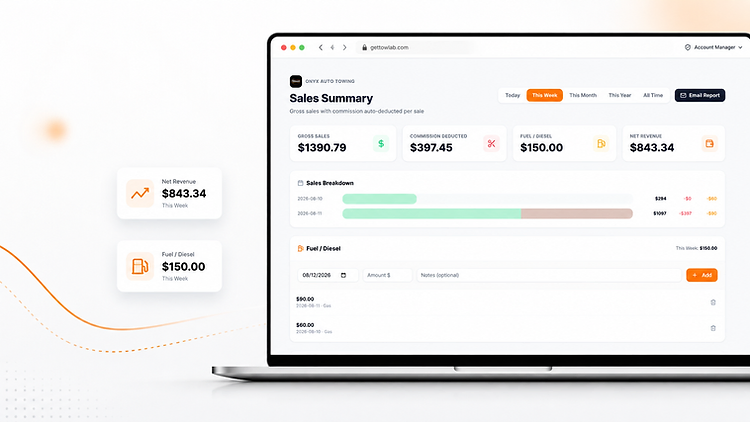
The sales summary starts with gross sales, subtracts driver commissions, fuel expenses, and other costs, and lands on net revenue — with per-driver commission reports and a service breakdown.
Log a vehicle on intake with photos and damage notes, track daily storage rates plus tow and admin fees, manage holds, liens, and required documents, then produce a PDF release invoice when the vehicle leaves the lot.
Track trucks, plates, VINs, status, and which driver is behind the wheel, so you know what is available before you commit to the next call.
An AI agent you embed on your towing company website with one line of code. It answers your FAQs around the clock, collects callback requests, and takes quick tow requests, then emails them to your inbox.
How a tow moves
Every towing company already thinks in stages. Dispatch software should match those stages instead of inventing new ones, so the board reads the way your operation actually runs.
A call comes in and the job is logged with customer, vehicle, pickup, and destination.
You assign the nearest available driver and truck. The driver receives an alert with the job details.
The driver accepts and starts moving. The customer can follow the tracking link.
Vehicle details, photos, and the VIN scan are captured on the driver’s phone.
The job is closed out with completion notes and the rate attached to it.
Two endings stay visible for reporting: a job delivered to the lot becomes an impound record with storage billing attached, and a cancelled job stays on the board so you can see what fell through.
Getting started
No hardware, no installer, no onboarding project. Sign up, set up your team, and dispatch — the same day.
Create a profile for each driver — contact details, license, assigned truck, pay model — then add your trucks.
Enter your price for each service: hook fee, per-mile rate, minimum charge. The amount lands on the job instead of being quoted from memory.
Log incoming calls and assign them. Drivers get the job on their phone and update status as they work it.
Take payment or send an invoice. Then check the sales summary for gross sales, commissions, fuel, and net revenue.
How to choose
Towing platforms look alike in a demo. These are the points where they differ — and where the cost of choosing wrong shows up later.
Per-user and per-truck fees quietly raise your cost every time you hire. Compare total cost at your truck count, not the entry price.
Impound, storage billing, invoicing, and commission reporting are commonly sold as paid add-ons. Confirm what sits inside the base price.
Hourly, commission, and per-tow pay all need to be supported, with reports that show what each driver earned.
A web link per job keeps drivers working the same day. An app rollout becomes a training project you did not budget for.
You should be able to invoice and send a pay-by-link from the job, then record how it was settled.
A tracking link per job reduces inbound "where is my truck" calls and keeps the dispatcher off the phone.
Gross sales look strong until commissions and fuel come out. The system should subtract them automatically.
You should be dispatching the same day you sign up — no hardware, no installer, no multi-week onboarding.
Platform comparison
The honest comparison: what your office does today by hand, what older towing platforms typically include, and what a modern platform should cover at one flat price.
| Capability | TowLab | Whiteboards, paper & spreadsheets | Legacy tow software |
|---|---|---|---|
| Dispatch board & job status | Live board, pending through completed | Updated by hand after the fact | Varies by vendor — often desktop-first |
| Driver pay & commissions | Hourly, commission, or per-tow, deducted automatically in the sales summary | Worked out by hand every pay period | Varies — commission reporting is sometimes an extra module |
| Invoicing & payment capture | Invoices, pay-by-link, and payment method tracking included | Paper invoices and a cash log | Varies — frequently an add-on |
| Impound lot & storage billing | Intake photos, daily storage rates, holds, PDF release invoices included | Impractical to track accurately by hand | Varies — often a paid add-on |
| Driver device | Phone link per job — nothing to install | Phone calls and text messages | Often requires a driver app install |
| Customer tow tracking | Shareable tracking link per job | Customer calls the office | Varies by vendor |
| AI website agent | OnyxBot included — embed with one line of code | None | Rarely offered |
| Pricing model | Flat $149/month, every feature included | Free, but paid for in hours | Per-user or per-truck tiers plus add-ons |
| Time to go live | One sitting — add drivers and rates, then dispatch | Already in use | Weeks of setup and training |
Vendor capabilities vary by plan and change over time — confirm the specifics with any platform you evaluate, including ours.
What it costs
The fastest way to compare towing software is total monthly cost at your truck count. TowLab does not change price as you grow.
TowLab
Every feature included, whether you run one truck or ten — no per-user fees and no paid add-on modules.
30-day free trial · No credit card required
FAQ
Direct answers to what towing companies ask before choosing a dispatch platform.
Towing dispatch software is a platform that towing companies use to log incoming tow calls, assign them to drivers, and track each job until it is complete. It replaces whiteboards, paper tickets, and spreadsheets, and usually adds driver pay tracking, invoicing, payments, and impound or storage billing.
It does four jobs: it captures the work (customer, vehicle, pickup, destination), assigns it to a driver and truck, tracks status in real time from pending to completed, and handles the money — rates, invoices, payment capture, driver commissions, and reporting.
Pricing varies widely. Many platforms charge per user or per truck and bill extra for modules such as impound or commission reporting, so a three-truck shop can pay $300 or more per month. TowLab is a flat $149 per month with every feature included and a 30-day free trial that requires no credit card.
In TowLab, drivers do not install an app. Each assigned job has a link the driver opens on their phone to see pickup and destination, scan the VIN barcode, upload photos, update job status, and call the customer. Drivers are working from day one instead of waiting on an app rollout.
Yes. Each driver profile holds a pay model — hourly, commission, or per-tow. When jobs are closed out, the sales summary automatically deducts driver commissions along with fuel and other expenses so you see net revenue, and per-driver commission reports show what each driver earned.
TowLab does. You log a vehicle on intake with photos and damage notes, set a daily storage rate plus tow and admin fees, track holds, liens, and required documents, and generate a PDF invoice for the release. Storage accrues on the record, so the balance owed is calculated rather than guessed.
Yes. Every job in TowLab generates a tracking link you can text or email to the customer. They open it to see the current status of their tow, which cuts down on the "where is my truck" calls that tie up the office.
TowLab records the payment method — cash, card, check, insurance, or account — and can email the customer an invoice with a pay-by-link. TowLab captures the customer’s payment details and sends them to you to run through your own POS or merchant account; TowLab does not process the payment itself.
With TowLab, setup is a single sitting: create driver profiles, add your trucks, enter your rates for each service, and start dispatching. There is no hardware, no installer, and no consultant, and drivers only need the link they receive with each job.
Yes. TowLab runs in a web browser on desktop, tablet, and phone, so you can dispatch from the office or from the driver’s seat. Drivers use a phone link per job, and owners can check the dispatch board, revenue, and driver status from a mobile browser.
A spreadsheet records what already happened; it cannot assign a job, alert a driver, or calculate a commission. Dispatch software moves a job through its statuses in real time, notifies the driver, captures photos and VINs, tracks payment, and totals commissions and net revenue automatically.
For a small operator, the value shows up in hours and errors: no midnight paperwork, no lost tickets, commissions that calculate themselves, and invoices that go out the same day. Because TowLab is one flat price with everything included, a one-truck owner pays the same rate as a ten-truck fleet and can add trucks without the bill moving.
How TowLab compares with Towbook on dispatch, driver pay, and impound billing.
Read guideBuilt and priced flat for one to ten truck towing fleets.
Read guideHourly, commission, and per-tow pay with automatic deduction.
Read guideIntake to release, storage fees, holds, and PDF invoices.
Read guideFree for 30 days. No credit card. Cancel anytime.